Devlog Entries
Generate devlog from kanban board
I track the tasks I'm working on in a self hosted Kanboard. As part of getting more public with what I'm working on, instead of languishing in obscurity, I'm going to start generating development logs from completed tasks.
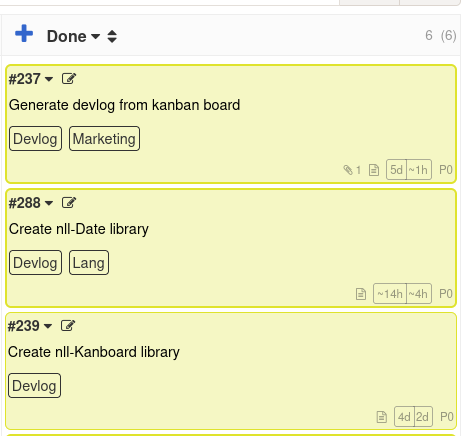
If you are reading this then it has been a success!
Since I want to be able to manage my tasks from CliffyPDA, i've already started some API access code to be able to fetch data via the Kanboard API. From there we can generate static HTML, and deploy alongside the rest of the website.
Tasks to be exported get tagged with Devlog and once they reach the "Done" column, the log entry will be added on the next manual site deploy.
Create nll-Date library
Currently we handle dates as Unix time, which is seconds since 1970.
1767285597 might be a perfectly accurate storage format, but we'll want something more friendly for users to interact with. For example, formatting that as 2026-01-02.
To do that we'll want to convert the Unix date into an object with fields for year, month and day.
Each language has it's own functionality for working with dates, so we'll just need to wrap those to make them accessible from NLL.
This library is now available here
Create nll-Kanboard library
To be able to export tasks from Kanboard into static HTML, we need to be able to fetch them to begin with. CliffyPDA already has some existing code to fetch data from the Kanboard API, but we'll need to move it into a reusable library, and improve it's functionality.
The library is now available here.
It's a bit slow as the API is not as friendly as what the web app is using, for example, tags are not returned when getting a list of tasks, so they need to be fetched individually. It's good enough for now tho.
In the future maybe we can move to directly accessing the SQLite database for reads and only use the API for writes, which will speed things up a lot while keeping the same interface.
Wrap application + input manager / quitting
Currently it's been a pain to shutdown the game.
Either Alt+F4 (which I've accidentally killed the wrong app once or twice) or switch to the terminal window and and hit ctrl+c.
So I've set it up so i can just hit escape to do so.
I had to dig around a bit to remember how to shutdown the game, and refreshingly my engine already had support for it. Just call ApplicationManager::QueueDestroy() and the game will cleanup everything (like waiting for threads to finish, and unloading assets) and then shutdown.
While shutdown and input handling is already implemented in my game engine, I did have to do a little work to expose the old C functionality to the new NLL code. But that was very straightforward wrapping.
Port over gui sprite and gui button
As a step towards making this a real game, I need to be able to draw sprites and click buttons.
This functionality is basically available in the legacy code, so it was just a matter of exposing it to the new custom language the game is written in.
For the GuiButtons, they did exist in legacy code, but I decided to rewrite them from scratch. But it was only a small ammount of work, as a button is a composite of two images (unpressed and pressed) and a text label on top. To handle clicks the Gui element can just be flagged as clickable, and the engine handles the rest.
First "real" UI
As the first pass of "real" UI, the game can now transition to different screens.
While they are both very sparse and have zero functionality, the game will now launch into a title screen, and then transition to the main game screen after clicking a button.
On the main game screen there's a top bar with a slight gradient and rounded edges, this is the first "art" created for the game. Everything else so far has been from older games of mine, or free assets.
Newer devlogs