Devlog Entries
Devlogs are small frequent updates as I complete tasks across various projects.
Use shared build and test scripts
Up until now, every new app has been setup with a copy of the scripts to build, test and run. Which has some obvious downsides when they fall out of sync and lose functionality. Also there were separate scripts for C++ and C# which leads to more files to copy and paste.
So now I've got a centralized set of scripts, and simple wrappers for each app. I've taken this opportunity to merge C++ and C# functionality so I can call Build.sh for C++ and Build.sh --CS for C#.
I've also added some bonus functionality to allow easy switching between the default of running C++ apps in gdb to using Valgrind for leak tracking. Previously this would require manually changing the script to uncomment lines.
Generate C# projects
I've cleaned up building projects a bit. For C++ we have been using ProjectGen to dynamically generate project files. So it would look at the source files in a directory and can build a Visual Studio or XCode or makefile etc.
For C# things haven't been as nice, i've just had build scripts calling csc with manually set directories of source files. This has mostly worked fine with Mono, but the more modern dotnet requires a project file, so I decided to clean things up and have ProjectGen generate for C# as well.
Inheriting disposable
disposable in NLL is basically a wrapper for C# disposable. Allowing us to unload something at the moment it goes out of scope, instead of waiting for the garbage collector. This is most useful with servers and sockets during tests, as we want to quickly cleanup before the next test runs.
disposable was a bit of a quick hack when originally added, and now has been improved a bit to be aware of class inheritance so it correctly calls the base Dispose when the inherited class disposes. It also starts enforcing that classes that inherit from a disposable class must also be disposable themselves.
Create freestanding terminal apps
While most code is written in my custom NLL programming language, these can only transpile into classes, and obviously have no access to native things like const char* args in C++. So for every application, I've still needed to create little C++ and C# to bridge the gap, and that's been quite a pain.
Now that code is still needed, but it can now be injected directly by the transpiler, by flagging a function as the @entrypoint. Some extra validation will happen co confirm the function takes the right arguments and is static, and then it will inject the bridge code into the transpiled source. So no need to manually add these little stub files for EVERY application in EVERY language.
Database migrations
No cool pictures to show today but I think there's something very cool for behind the scenes, and that's that I've built a tool for managing database migrations.
As we develop online games there's many smaller updates and changes that we want to make to the database, and we need a way to store and edit those so everyone and the databases remain in sync.
The most straightforward way is make every change a SQL file, and then we just work through, applying them in order till we are up to date. The gsMigrator tool does just that, with a few extra features for safety and reliability.
One is being able to revert changes. Each SQL file can be paired with another that will revert it, assuming it's changes can be reverted, and developers are not too lazy to create it.
The other feature is optional transactions. By default the SQL of a file is ran in a single transaction, so if anything breaks, the whole thing will be rolled back to be corrected and reattempted. This is very useful and makes things much safer as we won't end up with half applied changes. The problem is sometimes we don't want a transaction as it stops some other cool things from working. Index creation can take a looooong time if you have a lot of data, so there is the option to build them in the background, but this is not allowed when you are in a transaction. So i've added support to turn off transactions if there is a special comment on the first line of the SQL file.
Setup auto post to mastodon
In my own simple version of POSSE, these devlogs are now auto posting to Mastodon! There's not much to it, as mentioned in a previous devlog, posts are extracted from a self hosted kanban board into markdown to then to generate the static HTML. Now there's an extra app that scans those files, and if it detects a new one, creates a new toot from it.
Move to company id instead of company index
It's a bit weird that we can create and remove companies, but companies are also referenced by their index. So in theory we could try to action a company, but in the mean time an earlier company was deleted, and suddenly our index is wrong.
The straightforward fix for this is to give each company a unique id, then we can always safely reference them by it.
It's a little wacky with our as everything needs to be defined as the action is created, which for creating CPU opponents, means the player needs to generate that id and not the server. If it was just the server it would be easy and we could just have a variable we increment by 1 every time. Since it's just for CPU opponents in a game, and there's only going to be like 4, I think it's fine to let the player pick a random number as the id.
There's definitely more controlled things we could do, but its just not worth the effort currently.
Fixup operator handling
The initial code for my custom programming language would use the character token to define what an operator was eg: + or *. The problem is that some operators are more than one character, eg: += or >>. So what I had originally done was when tokenizing the source code i'd squish anything that could be an operator into the one "character".
This worked 99% of the time, until we get to nested templates, eg: Template<Class<SubClass>> the last two characters should be two separate right angled brackets, but get merged into a special double angled bracket. Then the template parser would fail as it specifically needs a single angled bracket to complete.
When I first ran into the issue, i added a quick hack to work around it, if there was a >!> in the code it would always parse as two angled brackets. Now quick fixes can survive forever, but the time has come for this one.
The operator code now handles a vector of tokens instead of a single one, that means we no longer need to merge characters, and so we don't need the hax on top of it.
Fix cross name class lookup
In my custom programming language, it had a very lazy system to resolve classes. This caused a bug where a class in a different namespace was being selected instead of the intended one. It's a bit surprising that it took so long to actually hit this issue, but unfortunately it required a large rewrite of the resolution code to fix.
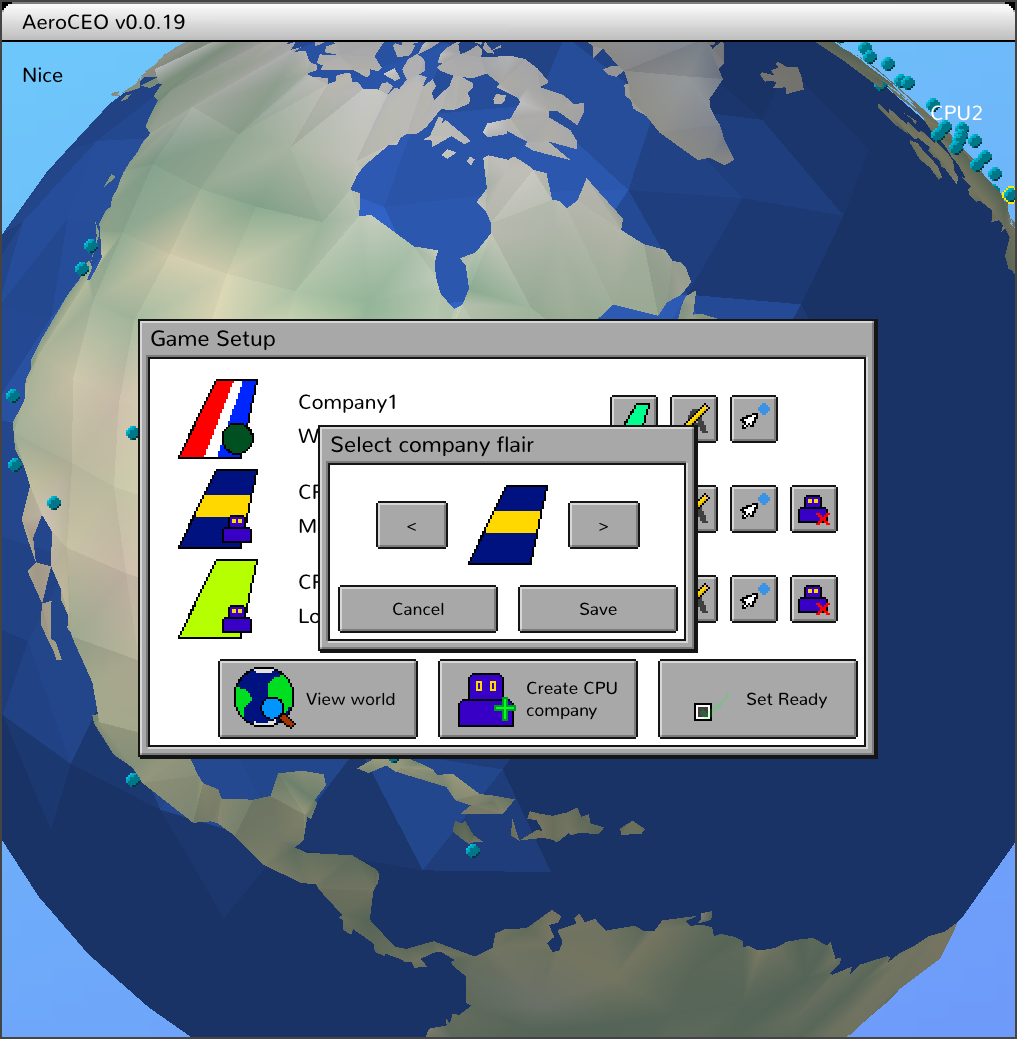
Select airline flair
You can now select the colour theme for your airline, in a popup GUI during game setup.
Game setup screen revamp
I've done a revamp of the game setup screen, moving away from the placeholder UI to something more final.
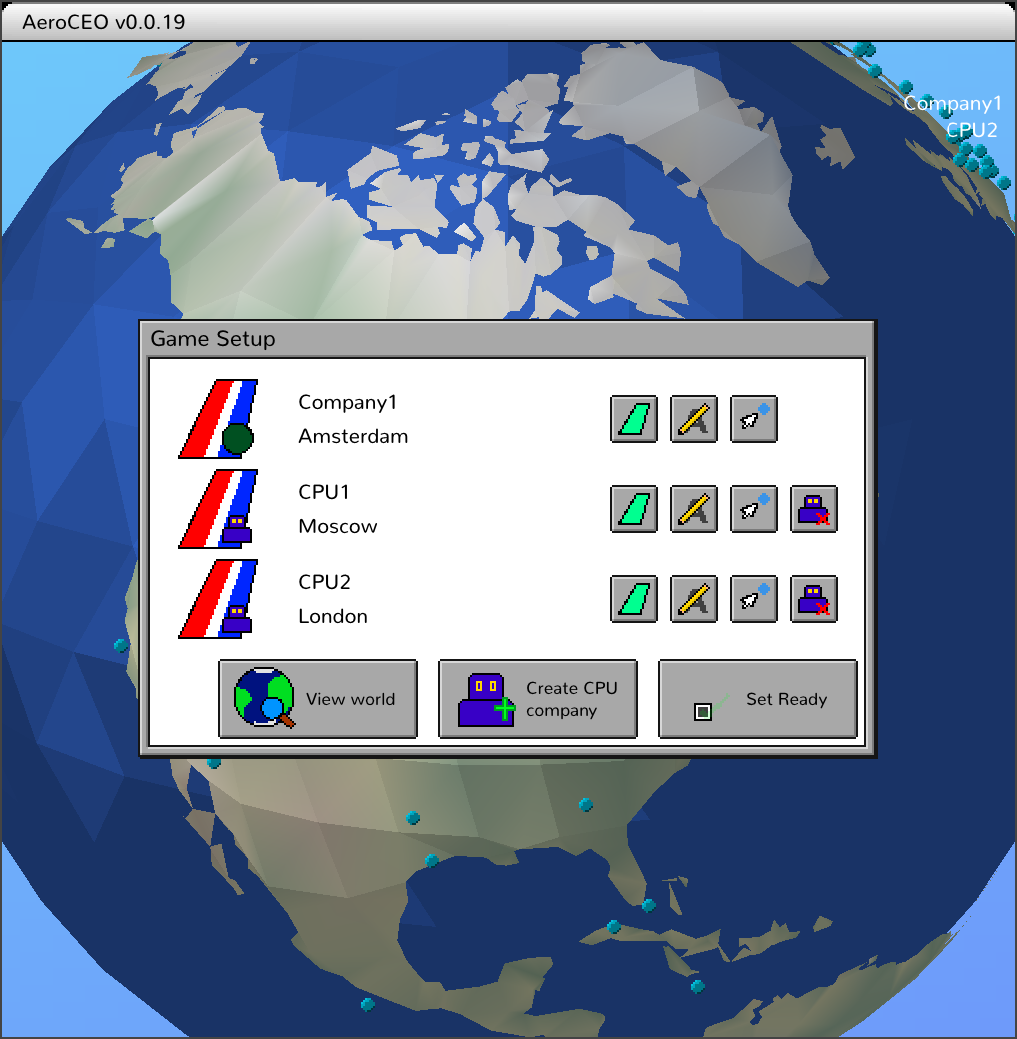
It's still pretty placeholder tho, haha. Hopefully a real artist will help in the future with everything.
Manually set starting airport for CPU players
If you are the first human player, you can edit the CPU opponents.
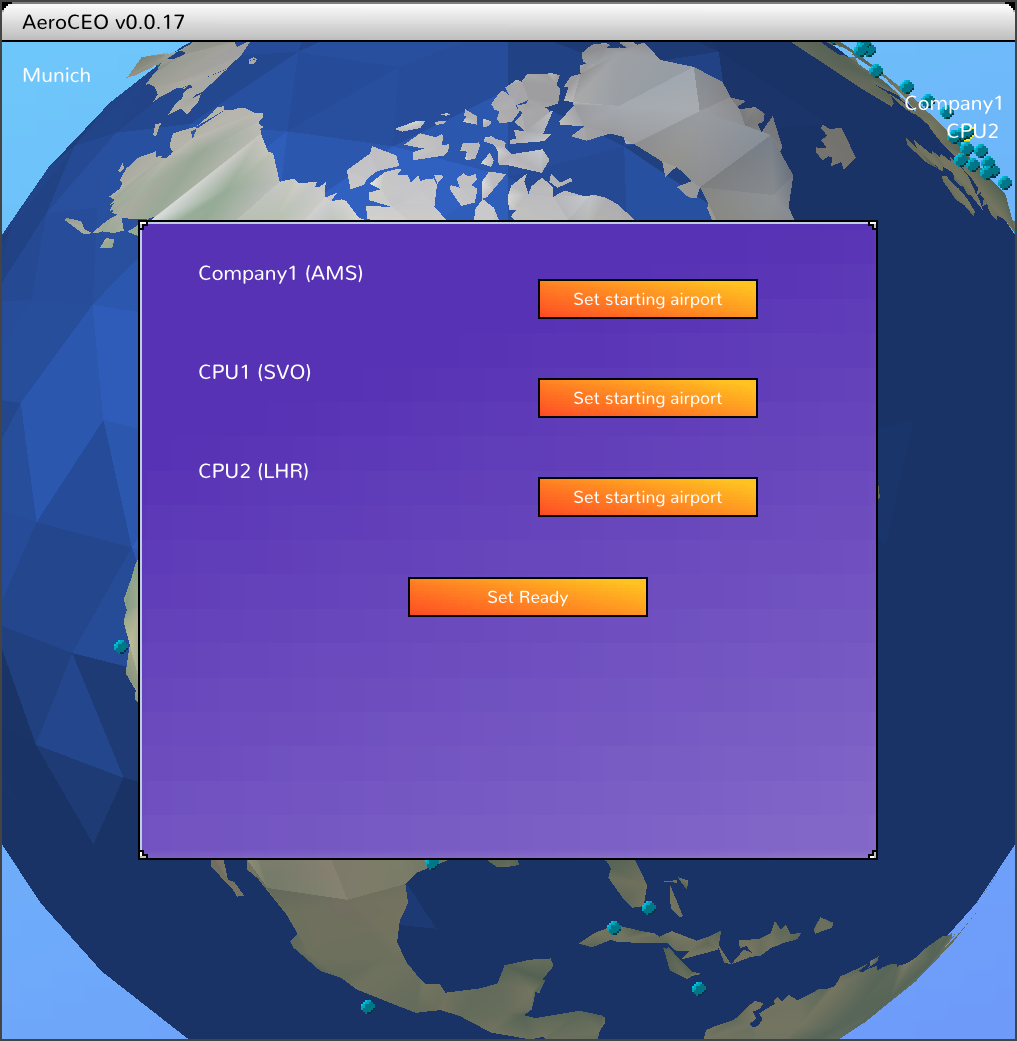
There was a bit of background work to this, as previously CPU opponents were virtually connected clients. So the server could not tell them apart from real humans. That was neat, but was a bit annoying with things like this, where to the server it would look like a hacker trying to edit another player. Also it would be a problem in the future with adding CPU opponents to multiplayer and mixing virtual and real clients.
So now they are companies created and managed on the server, and flagged as CPU.
Also these CPU opponents would set ready right away, which would then conflict if the player would try to set their starting airport later. So now CPU opponents will wait until all the humans have finished before taking their actions.
Select starting airport UI
In the pregame screen you can now select your starting airport, and see the selections of other players.
Multiplayer AeroCEO!
After much suffering i've got multiplayer somewhat working.
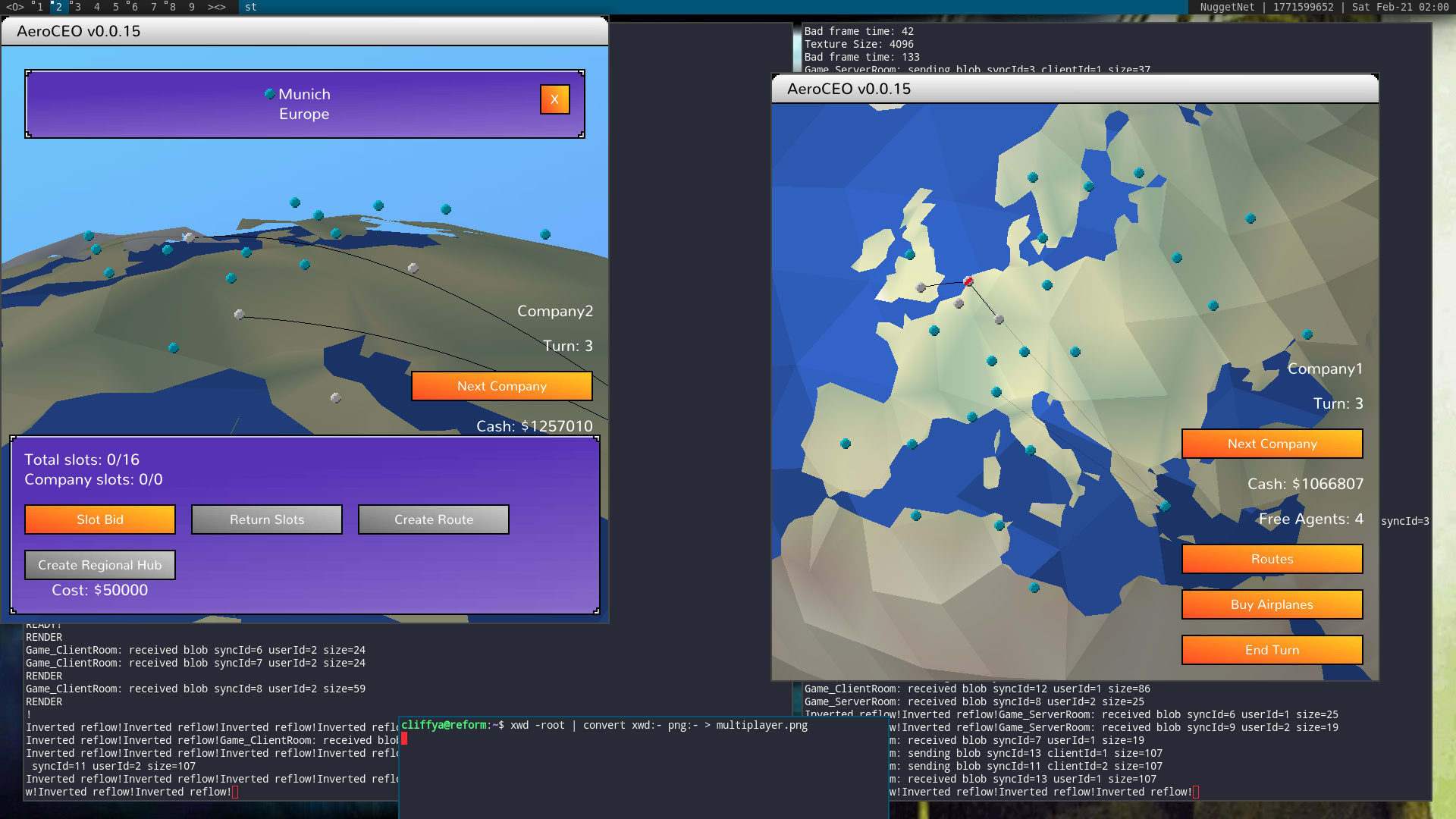
Here you can see two different perspectives on the world map. Note that a players routes are in solid black and the opponents are transparent.
Previous to this, the game itself has been theoretically multiplayer compatible. As it always runs with a server and client, and instead of using the network, actions are passed via a simple memory buffer.
So upgrading to real multiplayer still involved a lot of work around getting networking setup. Also there was a bunch of other tweaks and fixes and whole new menus that needed to be created so a player can even get into a game.
Simple Lobby
OK this took a little while but it's very exciting, AeroCEO now has a real networked client/server setup.
Here you can see the two games connect to the server and join a simple lobby, then one can make a game and the second one can join it.
Now technically they are both in their own single player games, so that will need to be worked on next. But now the players are connecting and being forwarded onto a game room where they can communicate.
Rework route create
I've updated the route creating and editing to be a nicer experience.
Now there's an initial step where the player picks the destination, rather than clicking around the full edit dialog. The route is shown in white, and the camera moves to display it.
I had to revamp the camera systems a bit, as previously there was only the user controlled position, and focusing on an airport, with the only transition being moving back and forward between them. Now we also have and additional option, focusing on a route, and moving between any of the three options complicates things.
Update airport UI
I've updated the airport UI to be closer to my idea of what the final setup will be. Having the city name and some details at the top, and a horizontal selection of actions across the bottom.
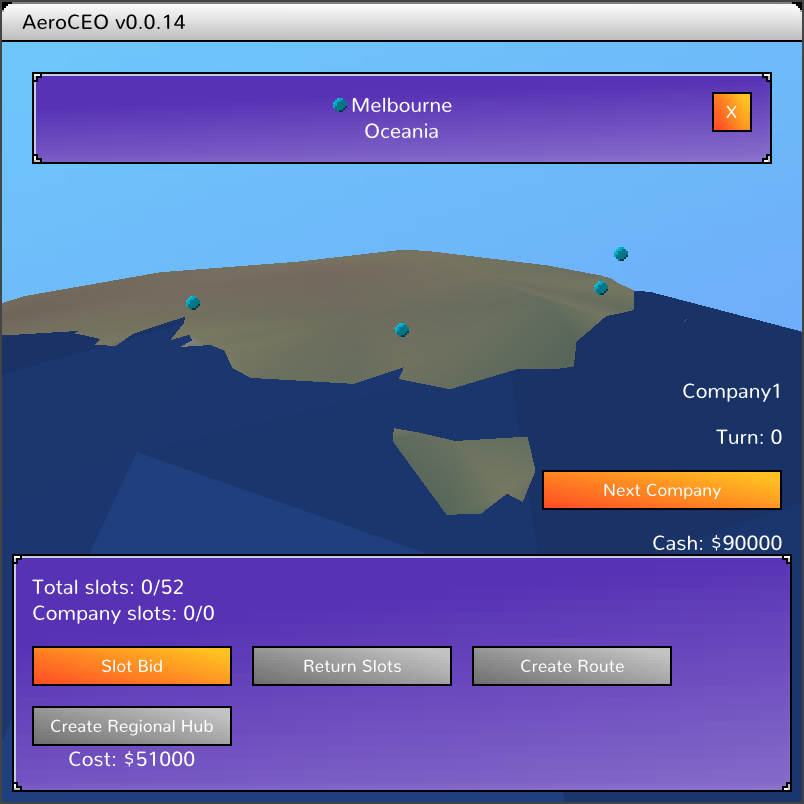
Better UI states
The UI is a little nicer now with knowing what state things are in.
So when a UI window is up, you can no longer click the ones below, this was leading to some weird states and crashes.
And also now the range rings only appear when you are actually creating a route, and they are needed. I'll need to add an extra "range finding" mode to airports as well, as you might still want to plan ahead and check ranges before you can make routes.
Camera zoom when selecting airports
Here's a bit of flair, when selecting an airport, the camera will now swing in to give a better view.
This is leading to the background / flavor image for each airport. I'm thinking that we show some kind of big sprite on the map that's unique for each city. Like a Sphinx in Cairo, or the opera house in Sydney.
I've setup a new Camera class to handle this stuff. Originally it was just a bunch of numbers in the world rendering. Now it manages the user controls, and dynamically swinging over to the targeted airport.
You can also see in the video that it switches back when creating a route so you can actually see what you are doing.
Airport range rings
I had initially setup the game to display little pips on every airport to show how far away they were from the currently selected airport. But that causes a bit of visual clutter. So I'll try out drawing some concentric circles instead.
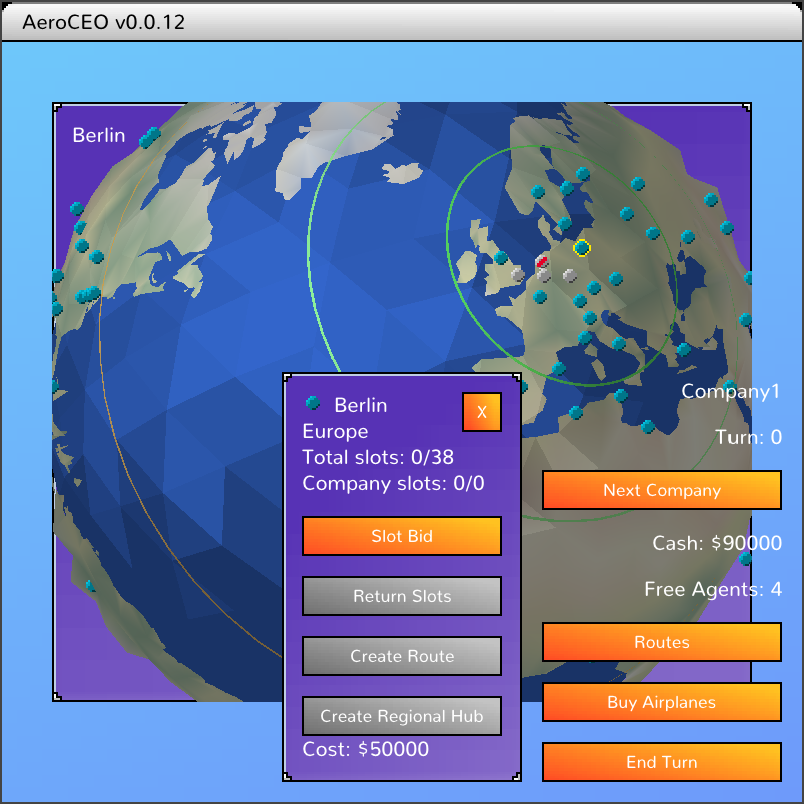
We'll try this out for a little while and see how it goes.
Camera dolly
We can now move the camera in and out with the mouse wheel.
I've put a little acceleration on it, and also scaled the rotation when clicking and dragging so things feel nice and smooth.
Route arcs
I've made the routes cooler looking by making them arc between airports, as opposed to being a straight line.
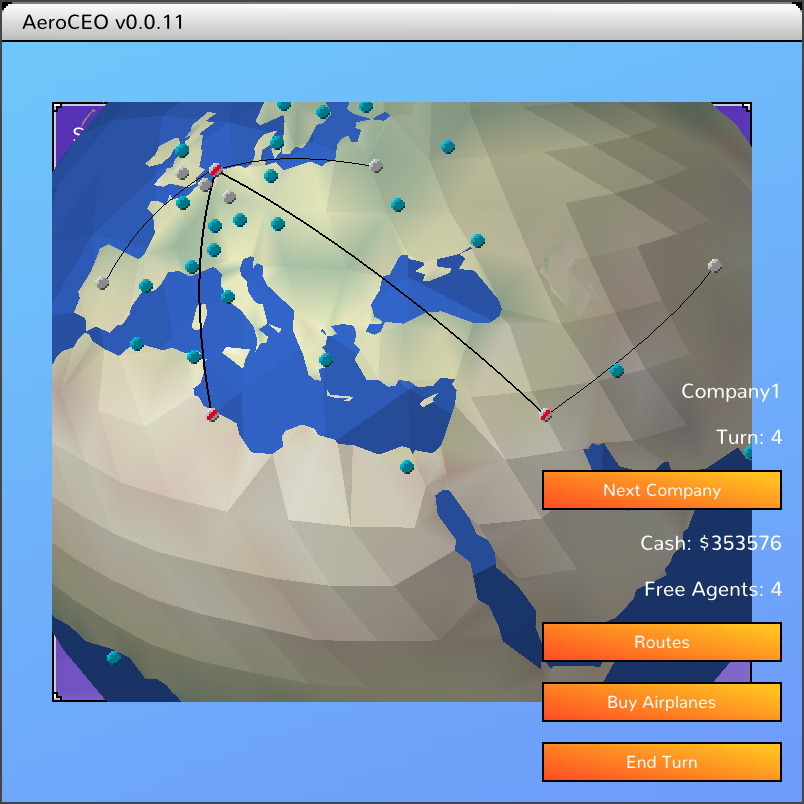
I've also setup thicker lines for international vs regional routes.
World lighting
I've added some simple lighting to make the 3D globe pop a bit more.
It's pretty simple, just a single light in the corner. I've gone for flat shading as well for a more retro look.
Oceans
I've now added simple ocean rendering to AeroCEO.
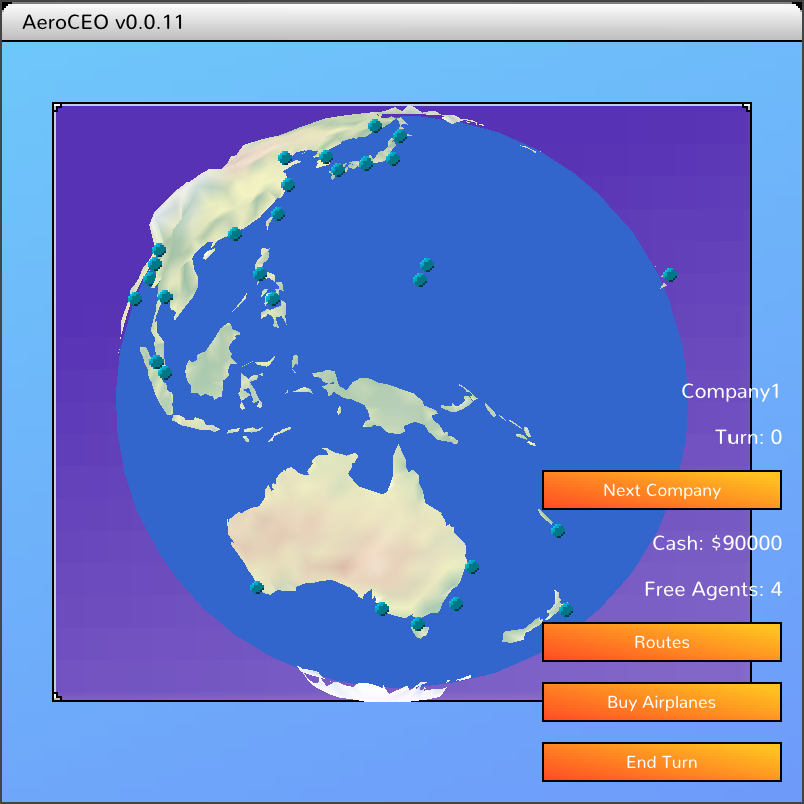
It's a simple blue sphere, created by geodesic tessellation so the triangles are equally spaced. As latitude and longitude will bunch up towards the poles.
I did a bit of play with the depth buffer again, to avoid z fighting where the water is very close to the land. The ocean is pushed back so the land has priority.
I've also turned on back face culling so the back side of the world is no longer rendered, since it can't be seen now with the water in the way.
3D airport cleanup
I've cleaned up the airport rendering and input a bit more.
The icons are now testing against the 3D depth buffer, so they will now be obscured by the world if they are behind it.
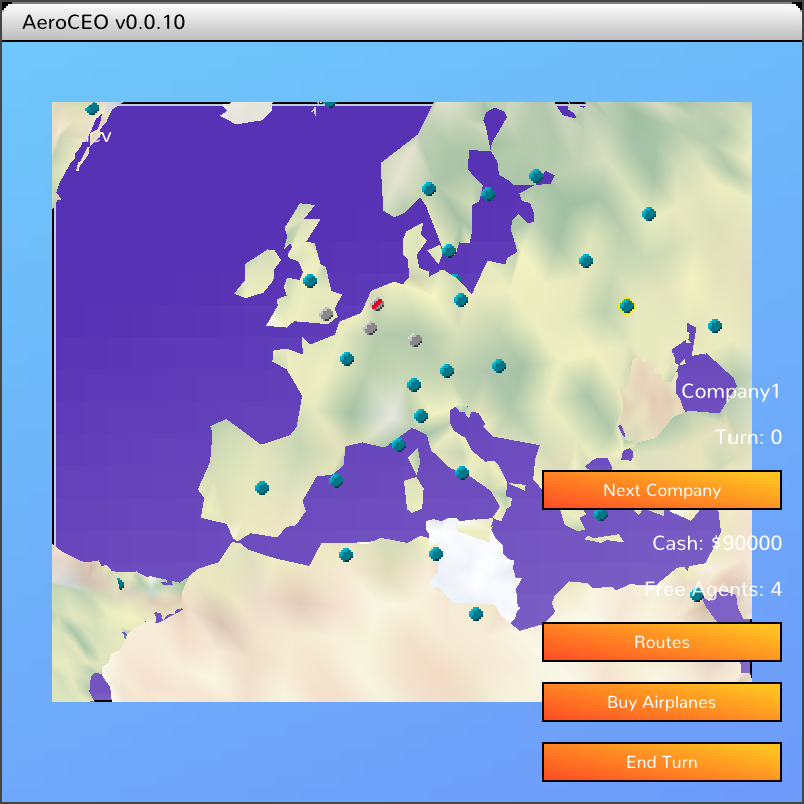
Kind of hard to show what isn't visible haha... But I promise that Australia is behind Europe in this screenshot (simiar to the video in the previous devlog), but now it's airports are properly obscured.
When generating the locations, i did offset airports a little bit above the world, so hopefully we don't end up with any z fighting weirdness.
I've also added a check to the mouse selection code to only allow interaction with airports on the nearest side of the world. It's a pretty simple check, since we are transforming all airport points in 3d around the world, we also transform a point at the center of the earth (0,0,0). And if an airport is closer to the camera than that, we allow clicking on it.
Airports in 3D
Now that we have a cool 3D world, we need to add back in the functionality that the 2D version had.
Next up is showing the airports on the world map. After a bit of pain with not being able to align the scales between the world an the airport I was eventually able to work it all out.
As you can see, there's still things to work on like the airports and continents behind the world still being visible. But if feels very solid now.
I use the same matrix to render the world and to calculate the screen positions of the airports. And with those screen positions, we can also work out what the user is clicking on without any complex 3D math.
Render 3d world
It's time to start getting fancy with the world view in AeroCEO.
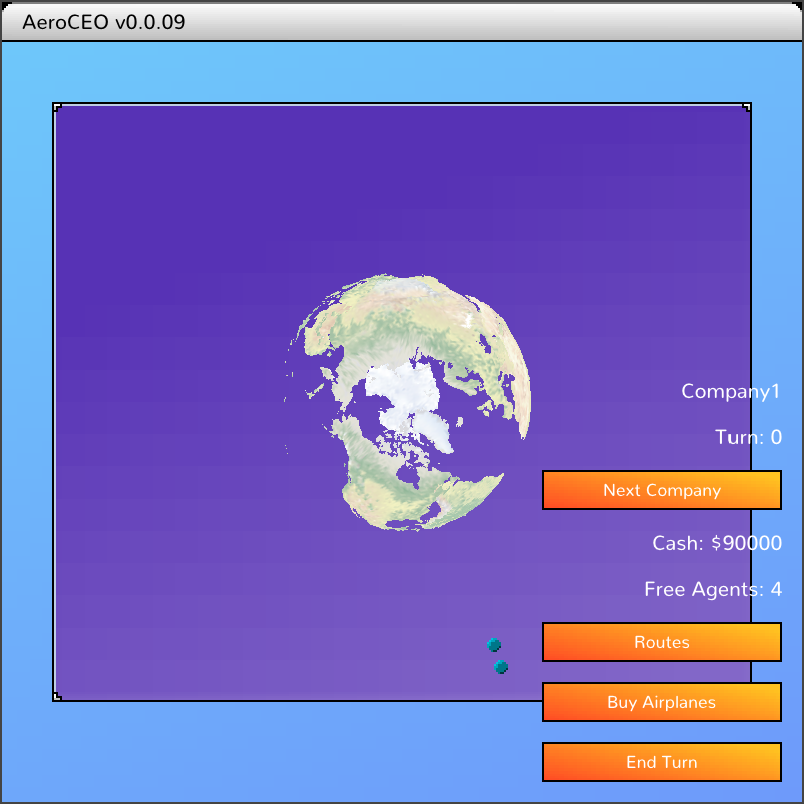
The polygon outlines of landmass, and colors come from Natural Earth Data. I then ran it through a custom program to tessellate and convert it into a 3d model for rendering in game.
This is another good enough for now kind of thing. The 3D model will need a lot more processing work to look nicer, but alternatively I hope to find an artist to do a cool stylized version instead.
It has no effect currently, it just sits there looking cool in the background, while the airports are still on a flat 2d plane. But that will hopefully change very soon!
Building regional hubs
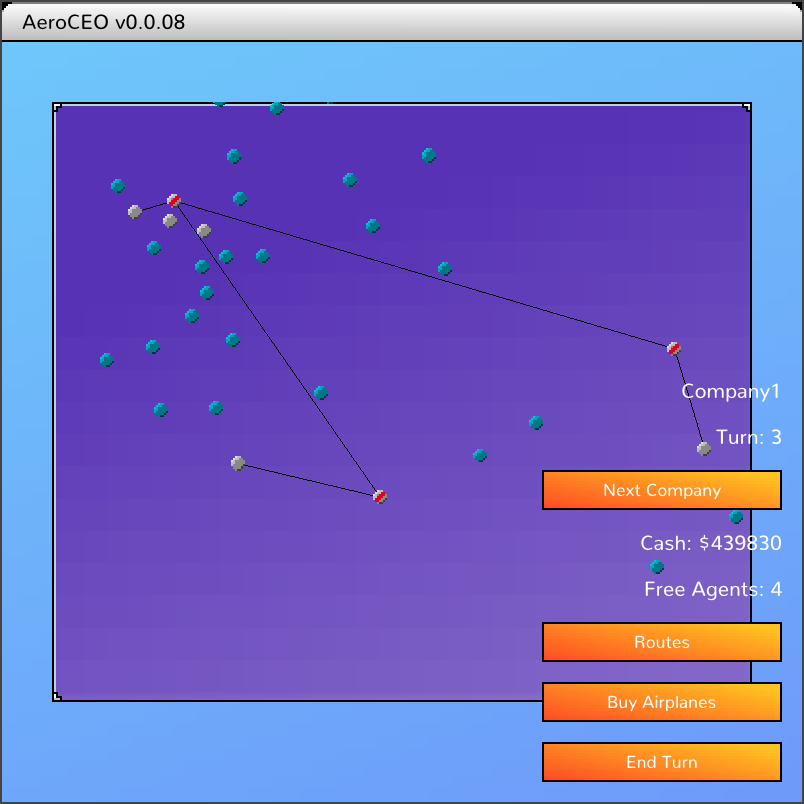
With a hub and spoke system for laying out routes, we can enter new regions, but we need to be able to setup new hubs in those regions to expand our reach.
So now I've added the ability to upgrade an airport to a regional hub. And that now unlocks building a cool web of routes.
Edit route
Now that we can view our created routes, and see how they preform turn after turn, now we want to change them!
The edit route dialog is pretty straightforward, as it's a modification on the existing create route dialog. If created with a reference to an existing route, it will preset with that routes details, and saving will then update the existing route.
There's a little bit of work around not allowing the user to change the destination, as they should create a new route instead. And also correctly checking if editing a route is valid. For example, since planes are already allocated to the previously created route, you only need to check if the company has enough planes to increase their allocation.
Route economics
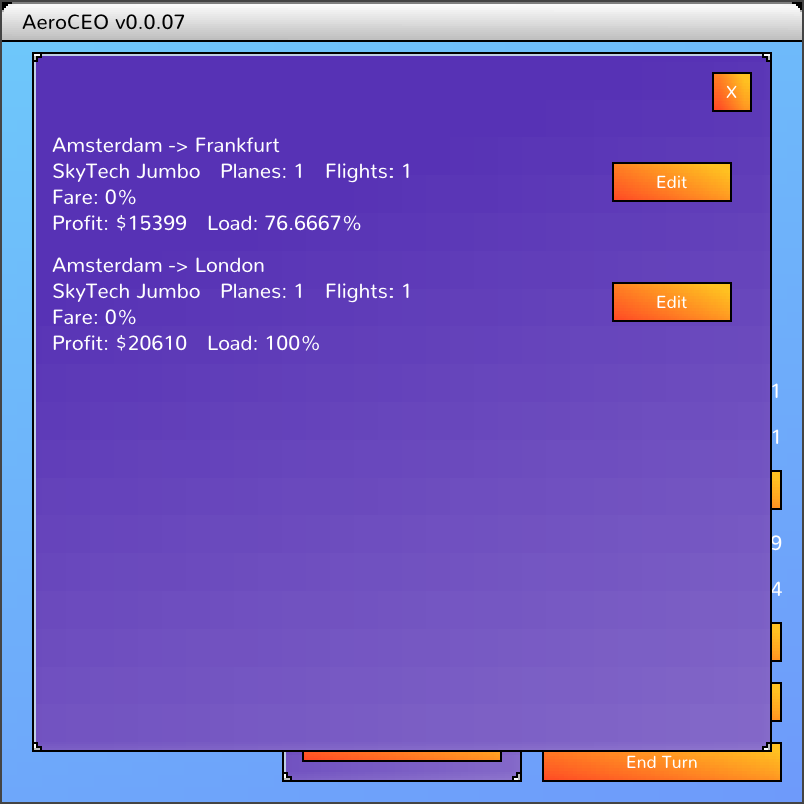
Now that we can create routes, it's time to ship some people and take their money! But how many people? How much money? What are the costs of flying a route?
Since this is a video game we don't need to study an economics textbook and derive scientific algorithms, just build some calculations that feel good to play with. Things like bigger cities should generate more passengers and longer flights should cost more in fuel.
We have some general city population data already tho in the future it would be nice to make it grow over time, and add other statistics like tourism and commerce multipliers. I also found a chart of annual oil prices and loaded it in to have a bit of a dynamic fuel cost that will change over time.
Via some very wild guessing, I've setup simple calculations for passenger demand, and fees for the route. For now that's good enough, we can correct and polish the numbers over time.
I decided at this point to just ignore inflation, so we'll see how that goes. It might be nice to think about later to add another variable to the mix. But the number of years a game goes through might not be enough to make it have a real effect on gameplay. It would have a noticeable effect on prices tho, with them no longer being nice round numbers that slowly go up every turn.
And to see the results of this, and to help the player manage their routes, I've started on a overview screen to view all the players routes.
Show airport distances on world map
In Aerobiz Supersonic, the distances between airports are not easily accessible. And the same can be said for airplane range, having to go through several menus and message boxes to see their stats in game. Usually when playing, I'd sit with a table open of all the airport distances and another with all the airplane stats. Even with the data, scrolling through tables and comparing the big numbers still isn't optimal.
So i'm trying to simplify this data crunching in a few ways. Firstly by changing distances down from thousands of miles to a simple 1-6 range. This also applies to airplanes, so it's quicker to see if a plane can reach a destination.
And secondly by showing the ranges on the world map when an airport is highlighed.
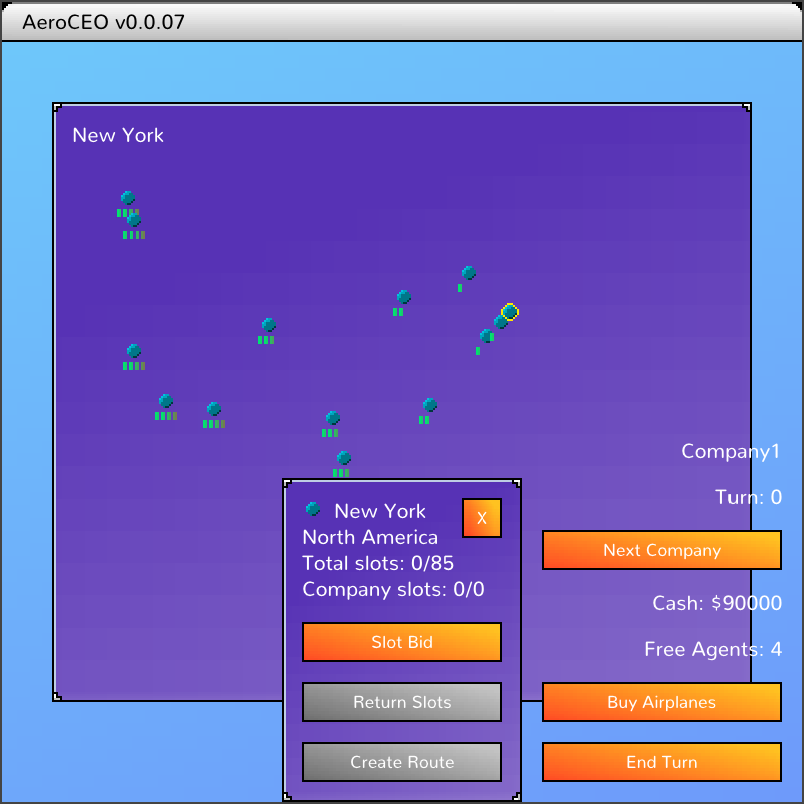
Here you can see New York is the focused airport, so nearby Chicago is a 2 range, and LA to the far right is a 4 range.
With the buy airplane screen also quickly updated to show these simplified ranges, it's easily too see what planes I should purchase for these routes.
Returning slots
Another quick GUI. Returning slots to the airport.
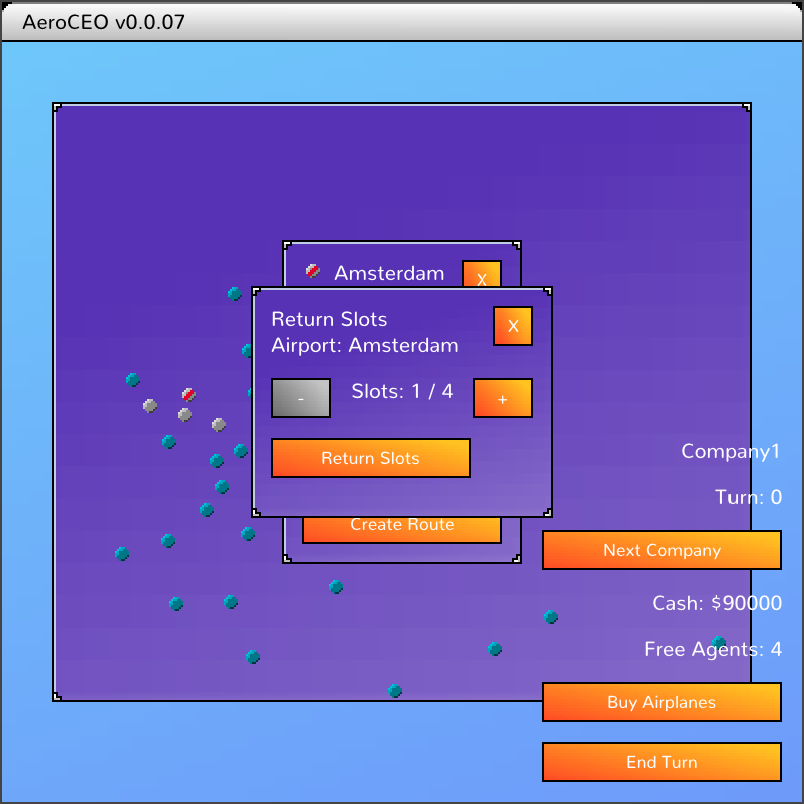
Long term, I'll make holding slots have a cost per turn, so the player will need to think about giving them up. As are reasons to hold onto unused slots as well, like blocking competitors.
Buy Planes
We can now purchase planes in AeroCEO!
Another simple UI, the player can click through the available aircraft and quantity to purchase. After ordering, the cost is deducted, and the planes will be delivered on the next turn.
Switch company view
We can now switch between companies to get a view of what they are doing.
Here you see we can switch over to the CPU player and see what airports they have.
The airport details window auto updates to show the info for the current company, and also buttons will disable to stop people breaking things by giving orders for other companies. (TODO: Make sure we have a test to confirm the server will also disallow that!)
If the player already has a window up that could make an action, like create route, that will close automatically if they switch to a company they don't have control over.
Previously each screen was either updating every label on every render (wasteful) or having a partial check to see if something had changed before refreshing. This broke pretty quickly with company switching so I've setup a more centralized system.
There's a single "dirty index" that will increment whenever anything notable changes, such as player taking an action or switching current company. Then individual screens can just watch that single value to see if they are out of date. Rather than tracking a more narrow set of things that specifically affect them.
It will lead to more updates than a very specific system, but it is much simpler and less likely to have stale screens. And it will still be hundreds of times of times better than updating every frame.
Slot bidding
Companies need slots at airports to accept flights and make routes. So they need a UI to request slots.
Slots are requested from an airport and currently take a turn to negotiate. In the future there will be a fee to stop players just grabbing everything, and make negotiations take multiple turns, depending on your companies relationship with the different countries.
Here we request some slots in New York, and end our turn. As the next turn starts, the bid completes and we get the slots, which you can see on the airport dialog. Also as we now have slots, the icon on the map changes.
I had to hook up a few extra bits of functionality to get this all working, like being able to end turn, and sending agents to make negotiations.
As the bid will take at least one turn, we need to be able to end the turn to actually test it. In single player it will instantly start the next turn, but in multiplayer the turn will only advance once all players hit end turn.
The player has a limited number of agents, who they send off to do more involved business dealings, simpler things like routes don't need them. The limit stops players from being able to do everything at once, which hopefully makes things a little more interesting, choosing what's most important to do this turn.
I also had to do some extra logic around the UI, so that once the player ends their turn, they can no longer take new actions until the next turn starts. So buttons get disabled, and if any action windows are open, like creating a new route, those get closed.
End turn action
As things get more advanced and we get into doing actions that take multiple turns, I've had to do some cleanup work around ending turns.
Up until now I've been running lots of automated tests that control the client and server. So when i need to advance the turn I can just make the server do it, by triggering a TURN_ADVANCE action there.
But in the real game, we need to wait for the user to manually end their turn before advancing. Also in multiplayer games we need to wait for all players to finish their turns before advancing for everyone.
So now each player can submit an END_TURN action, and then wait for the server to advance the game. While waiting they can still use the game UI to inspect things, but not create any new actions. So I had to add some more UI checks around that to disable buttons and close any editing/creation dialogs when the turn ends.
Show routes on map
We are now displaying the players active routes on the world map. Previously the player was able to create routes, but there was no visual confirmation.
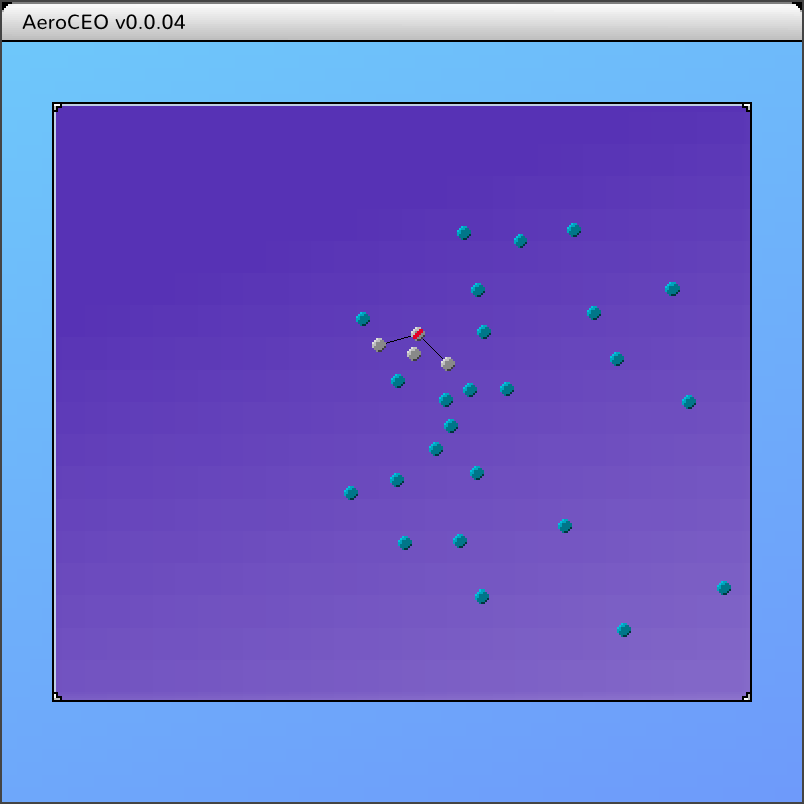
To get this happening, I first had to add line rendering to the engine. It's incorrectly scaled compared to the size of the rest of the chonky pixels onscreen, so I'd consider it more of a debugging function. But that's OK, this will work well for now. The route lines will be rendered much differently once we pretty everything up, maybe in cool arcs over the 3d globe, so no need to spend more time on it this iteration of it.
Create route UI
We now have a UI for creating routes in AeroCEO.
The buttons are mostly smartly disabling an enabling depending on what planes/airports/slots etc that the player has.
The destination can be selected by clicking on the world map in the background. That's a bit awkward with all the windows sitting on top, so you need to use the small area around the edges. It's functional enough to continue development for now, as the UI will be completely redesigned in the future once we have more of a feel for how the game should flow.
I've also ignored some questions about how the stack of UI should work with inputs being ignored by some windows but flowing down to others below. But that's a problem for future me.
As part of the multiplayer ready actions system, the CompanyCreateRoute action has its own validation code as well, and that's being ran and the result displayed at the bottom of the window. Currently that's not very user friendly, eg "INSUFFICIENT_SLOTS_DESTINATION", but it can be very granular, so long term it can be made much nicer and even highlight the UI element that needs to be changed.
So this validation runs on the UI, then when the action is applied locally, and also on the server in multiplayer games. So lots of good code reuse there, and everything should be consistent with the UI not allowing you to do anything that will get bounced later.
The route is actually created at the end, but there's no visual feedback, that will be the next task!
Clickable airports
To be able to access airports to create routes and all that other cool management stuff, we first need to be able to click on airports on the world map.
Clicking an airport now opens a dialog that shows more info plus a list of actions the player can take.
On the world map, I've also update the airport icons to give more info. Airports the player has slots at are highlighted in grey, and other airports where the player has no slots are blue. The red highlight signifys that the airport is a hub, where flights should originate from.
There was a bug with the game engine GUI where if an element is draggable and clickable, the click event would never fire. It was mostly straightforward to resolve, mainly by keeping better track of if the user is in the middle of a click or is actively dragging, and responding correctly when they release the mouse button.
The main complexity was how input flows through the GUI stack. This has been fine for previous games, a new window appears, sits on top of the stack, and can block all input to anything underneath it. Eg: a popup menu blocking the main view.
But the design for AeroCEO has the world at the bottom of the stack, sometimes taking input, and sometimes not. So initially you can drag around and select an airport, but then while the airport dialog is up, you cannot interact with the map. But then if you choose to create a new route, I want the world to accept input again so the destination can be selected.
The current solution is for the world to maintain an array of listeners, that get pushed on as they are created, and popped off when dismissed. Mirroring the way GUIs are stacked up. Then only the topmost GUI gets events, which it can act on or ignore. So the airport dialog would block the user from selecting a different airport. Then when a GUI is dismissed and the listener popped off, events will naturally pass back to the lower GUI.
Select airport UI
Before we can do things like get airport slots and create routes in AeroCEO, we need to be able to actually select airports. So I've made a few updates to the world input and rendering.
Clicking and dragging will scroll the map around, I've also setup cropping so that off screen airports are not being rendered.
Once the mouse is close enough to an airport, it's name appears in the top corner and it is highlighted on the map.
Most of the input, dragging and cropping code was already part of my game engine. But I had to do some mathing to convert the mouse x and y position on screen into longitude and latitude to compare to the airport positions. It's a little more convoluted to do it that way, but that should also convert nicely if the world is rendered in 3D later.
It's also a simple x+y distance calculation to find the closest airport. That can be made nicer later with a little bit of Pythagoras. Or even nicer again with the Haversine formula.
2D world map
Now that AeroCEO has a real "game" screen, it's time to add some actual game UI. The first thing will be laying out all the airports onscreen, based on their latitude and longitude.
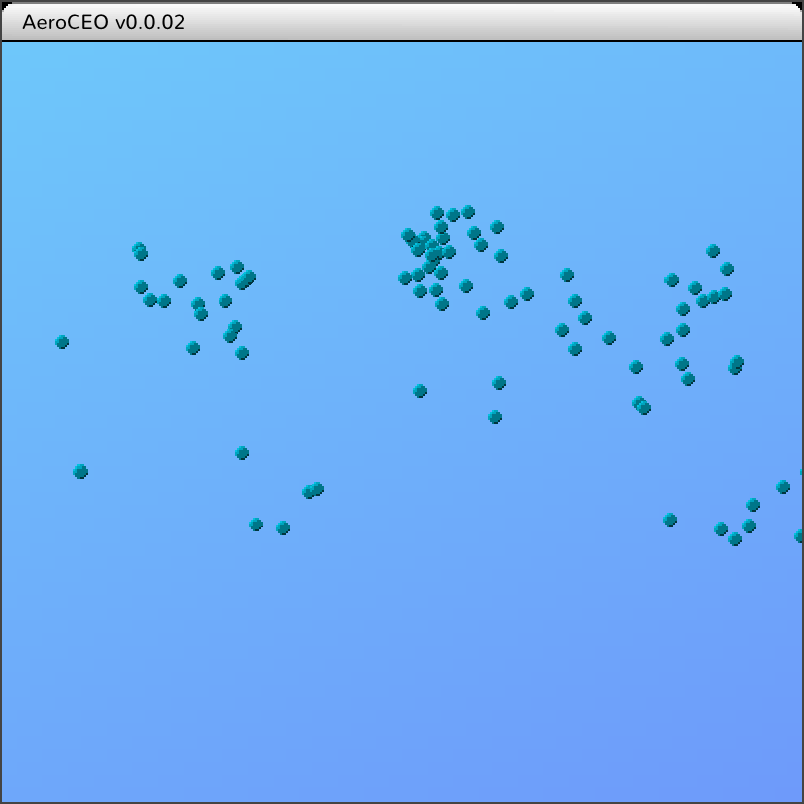
It's a little hard to see with no land mass behind, but that should be all the airports laid out correctly. But it is very possible that I might have inverted or broken something at this point. Assuming it's setup correctly, the center should be Europe, to the left is North America, and to the right is the Middle East then Asia.
Long term I want a cool rotating 3D globe that spins to focus on the current selection, but for now, simple 2D this is enough to keep progressing.
Later on, once things are mostly functioning but not pretty, there will be a whole design and art pass over everything. At that point we can look at 3D worlds.
Previously the static world data (things like airports and airplane stats) was not available inside the game UI, so I had to do some minor refactors to pass that in.
Generate devlog from kanban board
I track the tasks I'm working on in a self hosted Kanboard. As part of getting more public with what I'm working on, instead of languishing in obscurity, I'm going to start generating development logs from completed tasks.
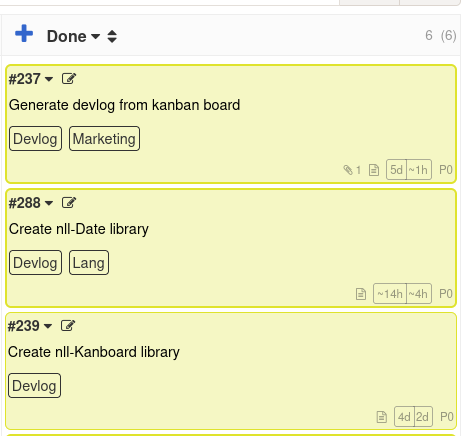
If you are reading this then it has been a success!
Since I want to be able to manage my tasks from CliffyPDA, i've already started some API access code to be able to fetch data via the Kanboard API. From there we can generate static HTML, and deploy alongside the rest of the website.
Tasks to be exported get tagged with Devlog and once they reach the "Done" column, the log entry will be added on the next manual site deploy.
Create nll-Date library
Currently we handle dates as Unix time, which is seconds since 1970.
1767285597 might be a perfectly accurate storage format, but we'll want something more friendly for users to interact with. For example, formatting that as 2026-01-02.
To do that we'll want to convert the Unix date into an object with fields for year, month and day.
Each language has it's own functionality for working with dates, so we'll just need to wrap those to make them accessible from NLL.
This library is now available here
Create nll-Kanboard library
To be able to export tasks from Kanboard into static HTML, we need to be able to fetch them to begin with. CliffyPDA already has some existing code to fetch data from the Kanboard API, but we'll need to move it into a reusable library, and improve it's functionality.
The library is now available here.
It's a bit slow as the API is not as friendly as what the web app is using, for example, tags are not returned when getting a list of tasks, so they need to be fetched individually. It's good enough for now tho.
In the future maybe we can move to directly accessing the SQLite database for reads and only use the API for writes, which will speed things up a lot while keeping the same interface.
Wrap application + input manager / quitting
Currently it's been a pain to shutdown the game.
Either Alt+F4 (which I've accidentally killed the wrong app once or twice) or switch to the terminal window and and hit ctrl+c.
So I've set it up so i can just hit escape to do so.
I had to dig around a bit to remember how to shutdown the game, and refreshingly my engine already had support for it. Just call ApplicationManager::QueueDestroy() and the game will cleanup everything (like waiting for threads to finish, and unloading assets) and then shutdown.
While shutdown and input handling is already implemented in my game engine, I did have to do a little work to expose the old C functionality to the new NLL code. But that was very straightforward wrapping.
Port over gui sprite and gui button
As a step towards making this a real game, I need to be able to draw sprites and click buttons.
This functionality is basically available in the legacy code, so it was just a matter of exposing it to the new custom language the game is written in.
For the GuiButtons, they did exist in legacy code, but I decided to rewrite them from scratch. But it was only a small ammount of work, as a button is a composite of two images (unpressed and pressed) and a text label on top. To handle clicks the Gui element can just be flagged as clickable, and the engine handles the rest.
First "real" UI
As the first pass of "real" UI, the game can now transition to different screens.
While they are both very sparse and have zero functionality, the game will now launch into a title screen, and then transition to the main game screen after clicking a button.
On the main game screen there's a top bar with a slight gradient and rounded edges, this is the first "art" created for the game. Everything else so far has been from older games of mine, or free assets.